GuidesRSVP tracking
RSVP Tracker: Spreadsheet Columns, Common Mistakes, and Easier Options
A spreadsheet can track RSVPs, but only with the right columns: invited group, people, status, headcount, notes, and follow-up. Here's the setup, the mistakes to skip, and when to switch to an RSVP website.
By Hejmo8 min read
Short answer
- Track
- Who was invited, who answered, how many are coming, and notes.
- Organize
- One row per invited group, not per message. Keep maybes separate.
- Switch
- To an RSVP website when families reply together and the count should total itself.
How to build an RSVP tracker spreadsheet
The quickest RSVP tracker is a spreadsheet with one row per invited family, couple, or guest group. Don't log one row per text or call; group rows match how people actually reply.
Add these columns and you can read your whole guest list, and your headcount, at a glance:
- Group: the Johnson family, Priya and Sam, or just Taylor.
- People invited: Maya, Leo, Priya.
- Invite link or contact: where you sent the invitation.
- Status: yes, no, maybe, or no reply.
- Confirmed headcount: the number you'll actually plan for.
- Maybe count: a buffer for food and seating.
- Notes: allergies, arrival timing, a sibling request, or a parent staying.
- Last follow-up: the date you last nudged them.
- Next action: remind, confirm, or nothing.
Track RSVPs by group, not by message
The most common RSVP tracking mistake is counting every reply as one person. It falls apart the moment a family shows up together.
When one parent says "we're in," a person-first tracker makes you decode who "we" covers. A group-first tracker lets you pin the answer, the count, and the note to the right household.
Messy row
Sarah: yes. Note: all of us. You still have to remember who "all of us" includes.
Clean row
The Johnsons: Maya, Leo, Priya. Status: yes. Headcount: 3. Note: Priya has a nut allergy.
Collect RSVPs with a form, organize them in a sheet
A form can do the collecting for you. Google Forms gathers responses and shows them in Forms or a linked Google Sheet, so you're not retyping replies by hand.
The sheet organizes those responses into rows, but it doesn't decide what they mean. You still read each answer to work out who's really coming, the headcount, and which notes change the plan.
- Use dropdowns or multiple choice instead of open text where you can.
- Ask how many people the reply covers if families can bring more than one guest.
- Collect allergies and timing in a single optional note field.
- Close the form, or follow up, once your deadline passes.
Common RSVP tracking mistakes
Most RSVP trackers fail for the same reason: they blur planning data with conversation history. Keep the tracker as your source of truth, not a transcript of every message.
- Counting a family "yes" as one person when it means three.
- Folding maybe guests into the confirmed headcount.
- Leaving allergy notes in text threads instead of the tracker.
- Letting guests reply in five places, so no single count is the real one.
- Forgetting to mark who hasn't answered yet.
- Sharing one public link for a private guest list, then losing track of who replied.
When to move from a spreadsheet to an RSVP website
A spreadsheet is fine for a small dinner or a host who likes manual control. It gets brittle when guests update their own answers, families reply together, or a co-host needs your current view.
That's where an RSVP website earns its keep. Guests answer inside the invitation, the count updates itself, anyone who hasn't replied stays visible, and notes stay with the right group.

- Use a spreadsheet for one-time, low-stakes, simple events.
- Use a form plus a sheet when custom questions matter more than the invite itself.
- Use an RSVP website when accuracy, privacy, and guest friction all matter at once.
How Hejmo tracks RSVPs
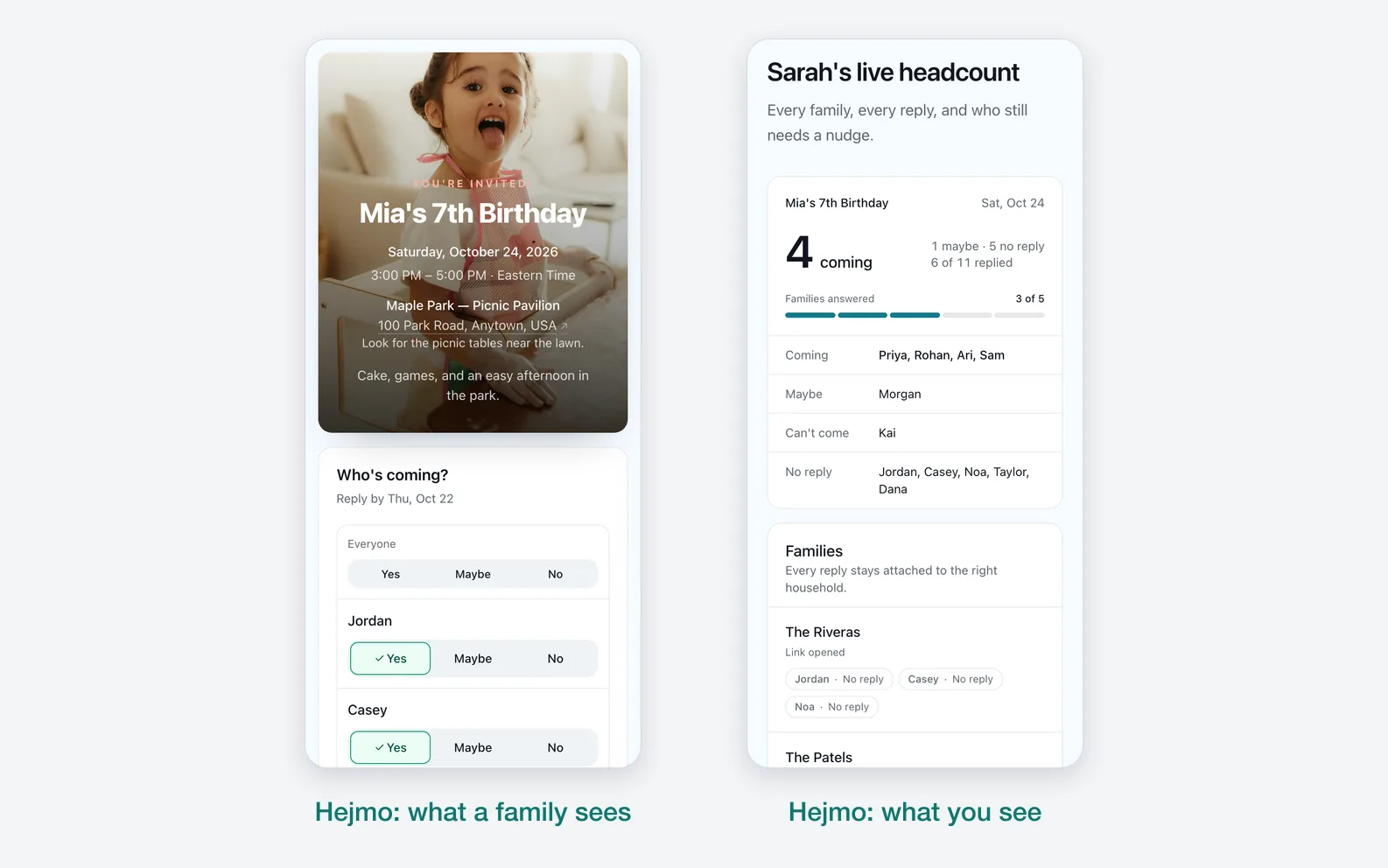
Hejmo builds the tracker from your guest list, so you never set up columns. You add families or groups, each one gets its own private link, and guests reply for the named people in that group.
The result is a host dashboard, not a spreadsheet to reconcile:
- One private link per family or group, already listing the people inside it.
- A dashboard showing yes, no, maybe, and no reply at a glance.
- Notes that stay attached to the right group, not buried in a text thread.
- A live headcount that updates as replies come in.
- Ready-to-send nudges for families who haven't replied.
You still own the follow-up
Follow-up still happens in your own texts and chats, but Hejmo makes it quicker. It shows who hasn't answered and writes a ready-to-send nudge for each family.
The real count no longer lives in those messages. It lives in one place that stays current as guests reply.
Sources checked (3)Official help and pricing pages, read before writing.
- Google Forms product page · Verified that Google Forms supports forms, responses from any device, and real-time response data.
- Google Forms response help · Verified response viewing and response-management behavior.
- Google SEO starter guide · Used for the site implementation principle that pages should help users and search engines understand content clearly.
Questions
What is an RSVP tracker?
It's the one place that shows who was invited, who replied yes, no, or maybe, how many are coming, and notes that affect planning. It can be a spreadsheet, a form plus a sheet, or an RSVP website.
What columns should an RSVP tracker have?
Use group, people invited, contact or link, status, confirmed headcount, maybe count, notes, last follow-up, and next action.
Can I track RSVPs in Google Sheets?
Yes. Google Sheets works for manual RSVP tracking, especially when paired with Google Forms. You still have to reconcile the responses into a guest list you trust.
What is the easiest way to track birthday RSVPs?
Give each family one link and count people, not replies. Hejmo does this for you: parents answer for their kids in two taps and you see a live headcount.
When should I stop using a spreadsheet for RSVPs?
Move to an RSVP website when guests need to update their own answers, families reply together, privacy matters, or the spreadsheet is becoming the event instead of supporting it.
Let the RSVP tracker update itself
Create your event, send each family its own private link, and let guest replies roll up into a live headcount. No more spreadsheet to reconcile.
Free · No ads · No guest accounts